Symphony Orchestra Simulator Scripts
What players look for, what actually exists, and why executor tools can cost your Roblox account.
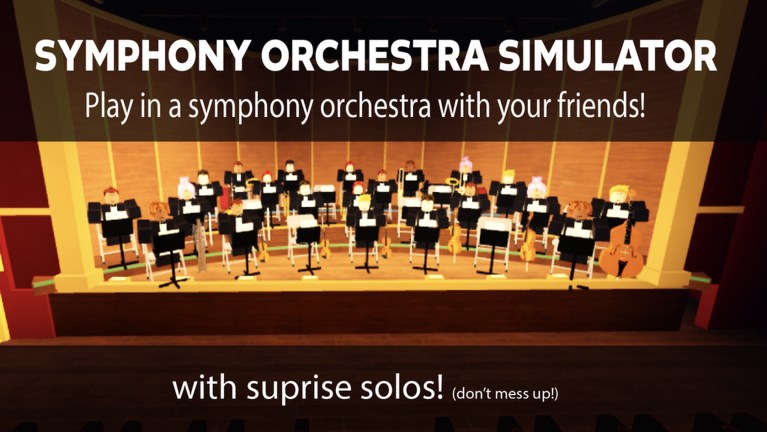
This Scripts Hub covers third-party executor tools people search for in Symphony Orchestra Simulator, the Roblox Music & Rhythm concert hall by merpug01. If you only want legitimate gameplay—instrument seats, song votes, spotlight solos, audience mode, and coin unlocks—skip this category and read Getting Started instead.
We document scripts because players search for them constantly. Documentation is not an endorsement. Using executors can violate Roblox Terms of Use, trigger moderation, and permanently ban the account you care about. There is no “safe script” guarantee, even when a GUI looks polished.
What this game is (so you know what scripts claim to touch)
Symphony Orchestra Simulator is an online co-op concert experience (universe id 10772237634, root place 120009540834199) with roughly mid–high concurrent traffic for a niche music title. Servers hold up to 35 players. You pick among 16 instruments (violin, cello, trumpet, flute, harp, timpani, and more), keep a seat across songs, vote for pieces such as Ode to Joy, Can-Can, Canon in D, Swan Lake, In the Hall of the Mountain King, or Flight of the Bumblebee, and sometimes take a solo spotlight while the crowd throws roses or tomatoes. Audience mode lets you sit in theatre seats and cheer. Request Concerto puts you center stage for a run of solos. Coins buy flashy solo entrances: confetti, fireworks, lightning.
None of that loop requires a script. Scripts promise shortcuts: command menus, speed, ESP-like helpers, or spammy GUI toggles that change how you interact with the hall.
What exists in the wild
As of November 2026, the main script style players circulate for this experience is an Admin Command Menu / Infinite Yield–style loadstring that opens a floating command GUI. It is a general-purpose command bar adapted or advertised for use while in the orchestra place—not a custom “auto perfect solo” trainer built only for this game. Feature sets typically include:
- A searchable command list and GUI window
- Movement helpers (walkspeed, jumppower, fly-style toggles depending on the build)
- Utility commands (rejoin, server hop, ESP-like labels, music or lighting toggles in some forks)
- Prefix chat commands familiar to Infinite Yield users
Deep feature notes, risk framing, and usage context live on the dedicated Admin Command Menu page. This hub stays high-level so you can decide whether to open that article at all.
Safety rules before you even open an executor
- Assume ban risk. Roblox detects many injectors. “Everyone uses it” is not protection.
- Never paste loadstrings you do not understand into tools that request account cookies or passwords.
- Do not confuse scripts with promo codes. Codes are official gift strings (none verified active right now). Scripts are unofficial clientside tools.
- Keep valuables off test accounts. If you insist on experimenting, use a throwaway—not the account with limiteds, credit card, or group ownership.
- Expect breakage. Patches, Hyperion updates, or place changes can stop a script overnight. That is normal, not a reason to download sketchier “fixed” malware packs.
- Respect other players. Speed-hacking through a concert hall or crashing a 35-player server ruins the fantasy for everyone who showed up to play music.
Scripts vs legitimate progression
| Goal | Legitimate path | Script promise |
|---|---|---|
| Better solos | Practice timing, pick a visible instrument, learn spotlight etiquette | Instant “win” toggles that may not even map to music skill |
| Cool entrances | Earn coins; unlock confetti, fireworks, lightning | Free unlock claims that often fail or flag accounts |
| Song control | Vote with the server; Request Concerto when available | Force-play commands that break for others |
| Free rewards | Watch for real codes after updates | Fake generators and stolen loadstrings |
If your goal is climbing comfort with violin versus timpani, read the Instrument Tier List for community preference on visibility and fun—not pay-to-win power rankings.
How this wiki handles script pages
- We describe features and risks in plain language.
- We do not guarantee uptime, undetectability, or support.
- We do not host malware, phishing pages, or “free Robux” side quests.
- We link related gameplay guides so curious readers can leave the scripts category quickly.
When Roblox or the developer ships anti-cheat or place updates, script behavior can change without warning. Check Updates for legitimate patch notes; do not treat script Discord spam as a changelog.
Related pages
- Admin Command Menu — detailed feature overview and stronger risk language.
- Codes Hub — official gift status (currently none active).
- Getting Started — play the concert hall as designed.
- Updates — real patch tracking.
Bottom line: the only script family widely discussed for Symphony Orchestra Simulator right now is the Admin Command Menu style GUI. Read the child page if you need specifics—and remember that the safest “script” is closing the executor and picking up a cello seat with everyone else.
Frequently Asked Questions
Quick answers to the most common questions.
Are Symphony Orchestra Simulator scripts safe?
No script is guaranteed safe. Executors can lead to account warnings or bans. This wiki documents what exists and warns about risk; it does not certify any tool.
What script do people use most for this game?
An Admin Command Menu / Infinite Yield–style GUI loadstring is the common mention. See the Admin Command Menu page for feature details and warnings.
Will a script unlock all solo entrances for free?
Do not count on it. Coin unlocks like confetti, fireworks, and lightning are part of normal progression. Script claims often fail or create ban risk.
Are scripts the same as promo codes?
No. Promo codes are official redeemable strings. Scripts require third-party executors. Check the Codes Hub for gift status.
Can I get banned for just opening a command menu?
Yes. Detection targets injectors and abnormal clients, not only obvious grief commands. If you cannot accept that risk, do not use scripts.