How to Redeem Symphony Orchestra Simulator Codes
A practical checklist for the day merpug01 ships a real promo code—plus what to ignore until then.
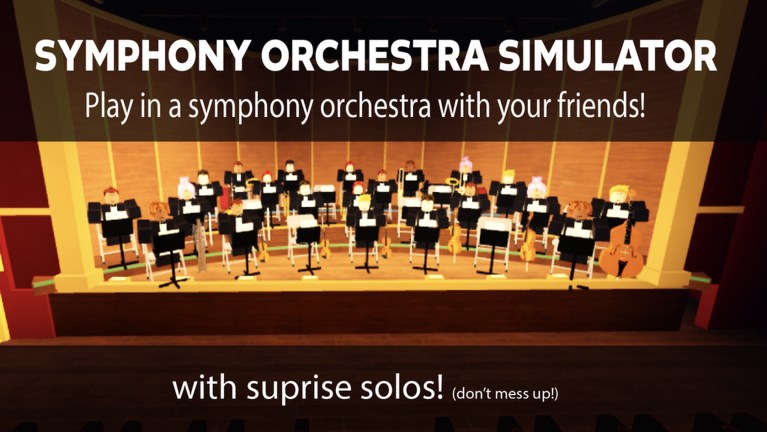
This guide explains how to redeem Symphony Orchestra Simulator codes the safe way. Important context first: as of November 2026 there are still no verified active codes for the Roblox Music & Rhythm experience by merpug01. Read this page so you are ready the moment a real drop appears, not so you can paste invented strings today.
Symphony Orchestra Simulator is a multiplayer concert hall (max 35 players) with 16 instruments, song voting, spotlight solos, audience seating, Request Concerto runs, and coin-unlockable solo entrances. Codes, when they exist, are usually a small bonus on top of that loop—extra coins or cosmetics—not a replacement for learning seats and solos. For current status, always start at the Codes Hub.
Before you redeem anything
- Confirm the code is listed as verified on this wiki’s Codes Hub or shown working in a trustworthy clip from inside the actual experience.
- Join Roblox on a normal client. Do not use “code redeem” websites that ask for your password, email code, or
.ROBLOSECURITYcookie. - Update your game client if Roblox prompted a restart; stale sessions sometimes fail UI buttons.
- Have a private note of the exact string, including capital letters. Many Roblox codes are case-sensitive.
- Know what you already own. If a reward is a duplicate cosmetic, some games silently grant coins instead—or nothing. That behavior depends on the developer’s implementation.
If a friend sends a code in chat, still verify it. Social spam often recycles expired strings from unrelated games.
Step-by-step redemption checklist
When a confirmed code exists, follow this sequence:
1. Launch the correct place
Open Symphony Orchestra Simulator from the official Roblox experience page (root place id 120009540834199). Make sure you are not in a lookalike or fan remake. The live hall should show instrument seats, audience areas, and the concert flow described in Getting Started.
2. Reach a stable lobby or hall UI
Stay long enough for GUIs to load. If the server is mid-song, wait for a calm moment so you can open menus without fighting the spotlight or vote panels. Crowded peak hours (thousands of concurrent players across the universe) can make UI feel laggy—retry once if a button does not respond.
3. Find the Codes / Rewards / Gift control
Roblox experiences place redeem boxes in different spots: a Twitter bird icon, a gift box, a shop tab, or a settings gear. Symphony Orchestra Simulator has not permanently documented a codes button yet because no campaign is live. When the developer adds one, look for labels such as Codes, Redeem, Gifts, or Twitter. Check the lobby first, then any persistent HUD corners.
4. Paste the code carefully
Tap the text field, paste the full string, and remove accidental spaces at the start or end. Do not add quotes. Submit with the on-screen Confirm / Redeem button—not by typing the code into Roblox chat unless the game explicitly says chat redemption is supported (most do not).
5. Confirm the reward feedback
A successful redeem usually shows a toast, popup, or inventory update: coins, a cosmetic, or an entrance unlock related to confetti, fireworks, or lightning. If nothing happens, wait a few seconds, check inventory or coin count, then try once more. Repeated spam clicks can lock a UI.
6. Note expiry and one-time rules
Many codes are single-use per account and expire after an event window. If redemption fails with “invalid” or “expired,” the string is done—even if old blog posts still display it. Return to the Codes Hub for the living list instead of trusting screenshots.
Troubleshooting failed redemptions
| Symptom | Likely cause | What to try |
|---|---|---|
| Invalid code | Typo, wrong game, or fake list | Re-copy from a verified source; confirm it is for this experience |
| Expired | Campaign ended | Stop retrying; wait for the next official drop |
| Already redeemed | One-use per account | Check coin/cosmetic history; you already got it |
| Button missing | No codes system live yet / UI not loaded | Finish loading; check Updates; do not use third-party redeem sites |
| Nothing granted | Soft fail or duplicate reward | Rejoin server once; verify you are on the official place |
Still stuck after a verified code fails for everyone? That is a developer-side outage—watch patch notes rather than installing random “fix” scripts. Executor tools are unrelated to promo redemption and carry ban risk; see the Scripts Hub if you need that distinction.
How to spot fake code lists
Fake lists share patterns:
- Dozens of codes “updated hourly” with no proof inside Symphony Orchestra Simulator.
- Generators that ask you to complete surveys or hand over login details.
- Strings copied from other orchestra-themed or music Roblox games and relabeled.
- Claims of infinite coins, admin, or every solo entrance forever.
A trustworthy update names the reward, shows a date, and preferably demonstrates the grant. Until then, assume no active codes and keep playing the intended loop: instrument seats, votes for Ode to Joy or Canon in D, spotlight moments with roses or tomatoes, audience mode, and Request Concerto’s five-solo spotlight runs.
After you redeem: sensible next goals
Codes should not replace progression. After any future gift:
- Spend coins thoughtfully on solo entrances you will actually use on stage.
- Practice the instrument you enjoy; community visibility rankings live on the Instrument Tier List.
- Learn when to sit in the audience versus when to Request Concerto at center stage.
- Skim Updates so the next patch or event code does not surprise you.
Related links
- Codes Hub — live status (currently none active).
- Getting Started — full beginner path for the concert hall.
- Updates — where code campaigns often get announced alongside patches.
- Scripts Hub — not for redeeming codes; safety notes only.
Bookmark this how-to page. When the first verified Symphony Orchestra Simulator code appears, the steps above are the checklist you will want open beside the game.
Frequently Asked Questions
Quick answers to the most common questions.
Can I redeem codes right now?
Not usefully—there are no verified active codes as of November 2026. Keep this checklist for when the Codes Hub lists a working string.
Do I redeem codes in Roblox chat?
Usually no. Most experiences use a dedicated Codes or Gift UI. Only use chat if the developer explicitly says that method works.
Why did my code say invalid?
Common causes are typos, expiry, already redeemed, or a fake list for a different game. Re-check the Codes Hub before retrying.
Is it safe to use online code generators?
No. Avoid any site that asks for your password or cookie. Redeem only inside the official experience after verifying the code.
Will redeeming a code unlock every instrument?
Unlikely. Instruments are part of the seat and play loop; codes typically grant limited currencies or cosmetics when they exist at all.