Symphony Orchestra Simulator Audience Mode: Seats, Roses & Tomatoes
Grab a theatre seat, cheer your friends, and throw roses—or boos—without leaving the concert fantasy.
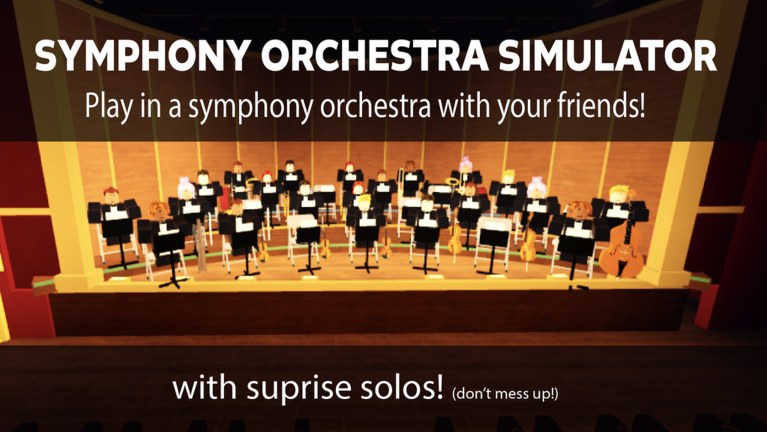
Audience mode is not a downtime penalty in Symphony Orchestra Simulator—it is half the fantasy. Grab a theatre seat, watch the orchestra, cheer, throw roses at great solos, or lob tomatoes when the bit calls for heckling. Up to 35 players share a hall, so the crowd shapes every spotlight and every Request Concerto. This guide explains when to sit audience, how reaction tools work, how to support friends, and how to stay kind without killing the comedy.
Instrument players should still skim Getting Started and Controls. Soloists should pair this page with How to Solo.
Why audience seats matter
- Rest without leaving — keep the social loop while your hands take a break.
- Support concertos — roses during a friend’s five-solo run change the vibe of the whole clip.
- Learn the repertoire — hear Songs and Voting staples before you claim a chair.
- Wait for instruments — popular seats free up; audience time beats server hopping.
- Film and spectate — camera-friendly reactions make better party memories than empty chat.
Audience play is valid progression for friendship and hall energy even when you are not farming coins every second.
How to enter audience mode
- Join the official experience.
- Look for theatre / audience seating away from the instrument grid.
- Sit using the on-screen prompt (see Controls if binds feel unclear).
- Confirm you can see the stage and reaction tools—cheer, roses, tomatoes, or similarly labeled actions.
- Stay through at least one full piece so you learn pacing before judging solos.
If seats are full, stand courteously near the audience area or claim a low-demand instrument temporarily. Do not body-block aisle paths during a concerto.
Reaction toolkit (cheers, roses, tomatoes)
| Reaction | Soft meaning | Good use |
|---|---|---|
| Cheer | Encouragement | Clean phrasing, funny bits, brave first solos |
| Roses | High praise | Friend concertos, clutch finishes, great entrances |
| Boos / tomatoes | Theatrical heckle | Agreed comedy bits—not targeted harassment |
The game markets crowd judgment as cheers and roses… or boos and tomatoes. That is stagecraft language. Use tomatoes like a cartoon opera audience, not like a reportable harassment tool. House rules: Players Hub.
Supporting a soloist
- Sit before the spotlight starts so your first rose lands on time.
- Spam-clicking empty air looks worse than one well-timed rose.
- If your friend requested a concerto, stay for all five solos (Request Concerto).
- Match energy to the song—Canon in D roses hit different than Can-Can chaos.
Being a funny heckler without being cruel
- Heckle the bit, not the person (avoid slurs, threats, or dogpiles).
- Stop if the soloist asks in chat.
- Never coordinate harassment across alts.
- Remember newcomers may not know tomatoes are theatrical—pair a tomato with a friendly chat tip once.
Audience etiquette checklist
- Do not steal an instrument mid-phrase just to grief a section.
- Do not stand in front of seated audience cameras during concertos.
- Do not fake “admin” threats in chat while throwing tomatoes.
- Do share the Official Links wiki map if someone asks where guides live.
- Do rotate back to instruments when you are ready—halls need players and listeners.
Pairing audience time with progression
Audience sessions still keep you in the hall while friends farm entrances. When you return to an instrument:
- Use the Seat Planner so your next claim matches the night’s goal.
- Skim the Instrument Tier List if you care about visibility meta.
- Check Codes only as a bonus habit—no verified promos as of November 2026.
Troubleshooting audience tools
| Issue | Try this |
|---|---|
| Cannot sit | Move closer to seat models; wait for load; rejoin once |
| No rose/tomato UI | Confirm you are in audience, not standing mid-stage; check Controls |
| Reactions feel delayed | Peak 35-player lag—time throws earlier |
| Soloist offended | Apologize; switch to roses; re-read Players |
Patch notes that change audience prompts will land on Updates and November 2026.
Related paths
- Request Concerto — the five-solo run you are watching.
- How to Solo — what the person on stage is trying to do.
- Solo Entrances — why confetti/fireworks/lightning get louder cheers.
- Players — community norms.
- Guides Hub — full how-to index.
Sit down, listen, and throw with purpose. The best halls sound like concerts because the audience showed up on purpose.
Frequently Asked Questions
Quick answers to the most common questions.
Is audience mode required?
No, but it is a core fantasy. Use it to rest, support friends, and learn songs before claiming a competitive seat.
Do tomatoes hurt another player's account?
No. They are theatrical heckles inside the experience. Still avoid harassment—see Players.
Can I earn coins while sitting audience?
Treat audience time as social and recovery play. Coin priorities and farming habits are covered on Earn Coins.
How do I help a friend's concerto?
Sit early, stay for all five solos, and throw roses on clean moments. Read Request Concerto.